
15+ triggers
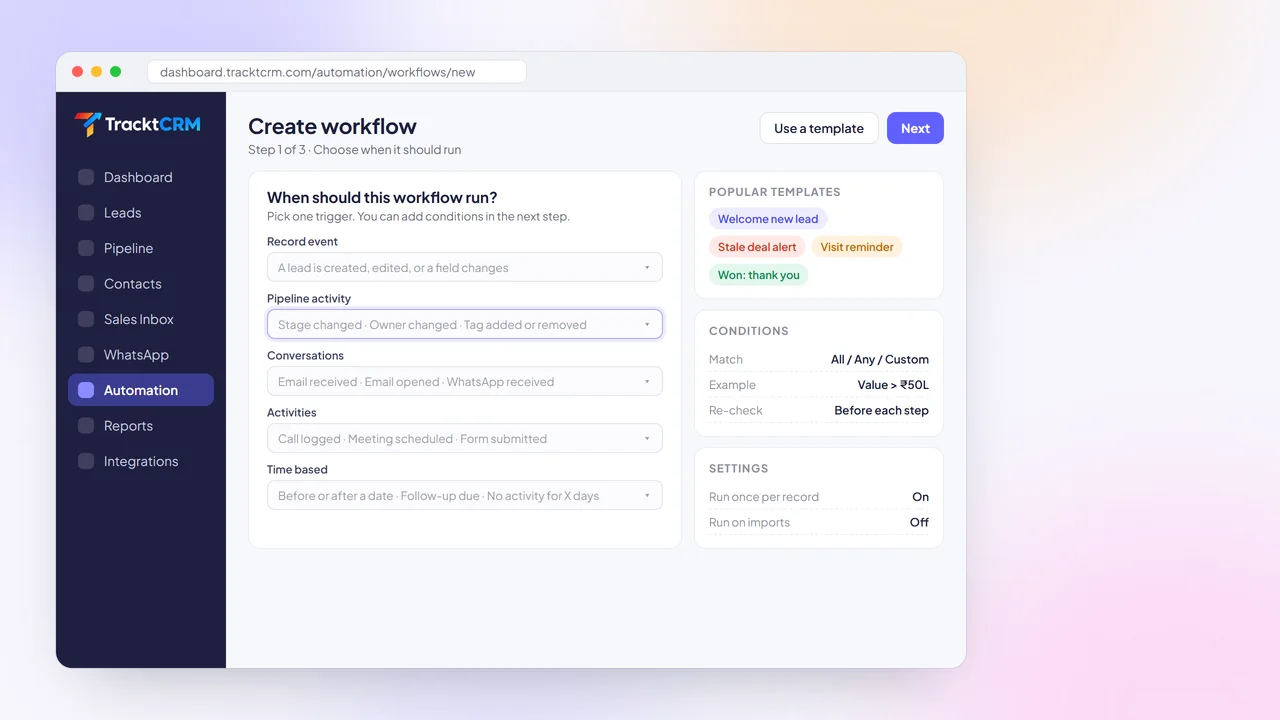
Run workflows when a lead is created, a stage or owner changes, a tag is added, an email is opened, a WhatsApp arrives or a form is submitted.
THE BASICS
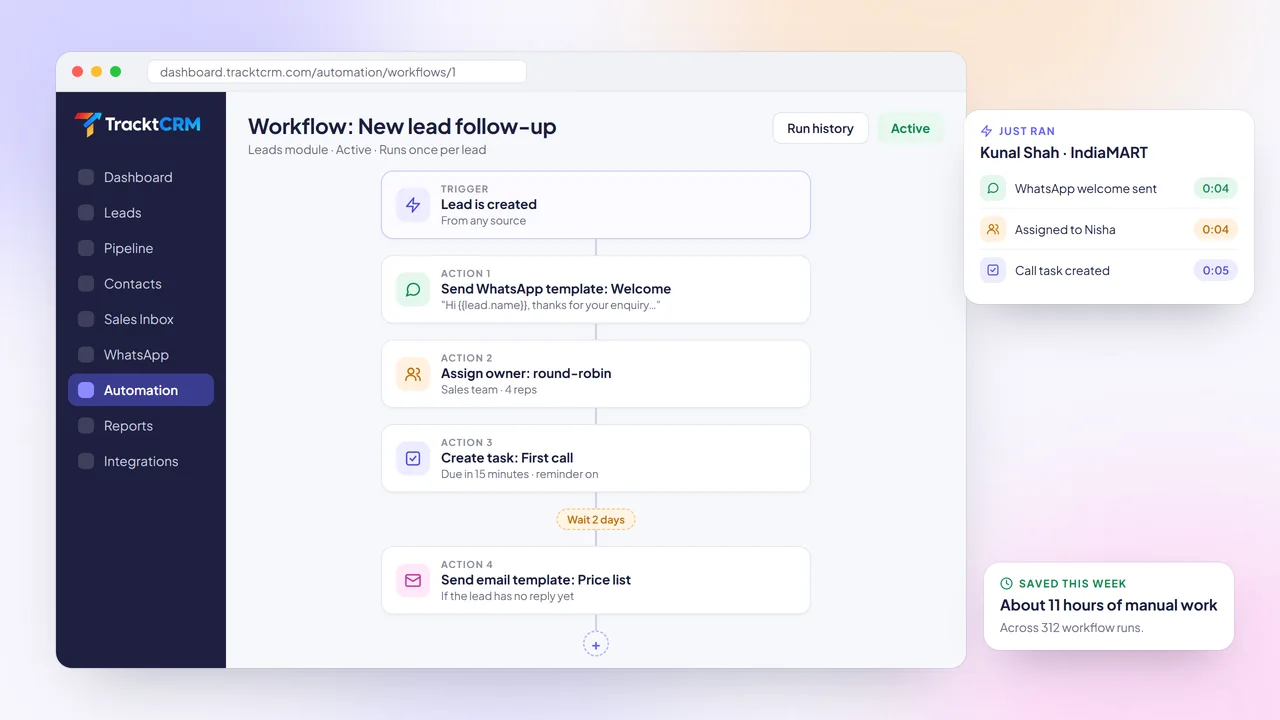
Sales automation uses rules in your CRM to complete routine steps without a person doing them. When something happens, such as a new lead, a stage change or a missed follow-up, the CRM takes the action you defined.
Good automation does not replace your reps. It makes sure the first reply is instant, the next step is always scheduled and managers hear about stuck deals before the month ends.
FEATURES
Build workflows with a simple trigger, conditions and actions layout. No code and no consultant needed.
Run workflows when a lead is created, a stage or owner changes, a tag is added, an email is opened, a WhatsApp arrives or a form is submitted.
Match all conditions, any condition or a custom pattern, using any field including your custom fields.
Send approved WhatsApp templates or email templates with merge fields such as the lead's name and product.
Create tasks, follow-ups and meetings for the owner, with due times and reminders.
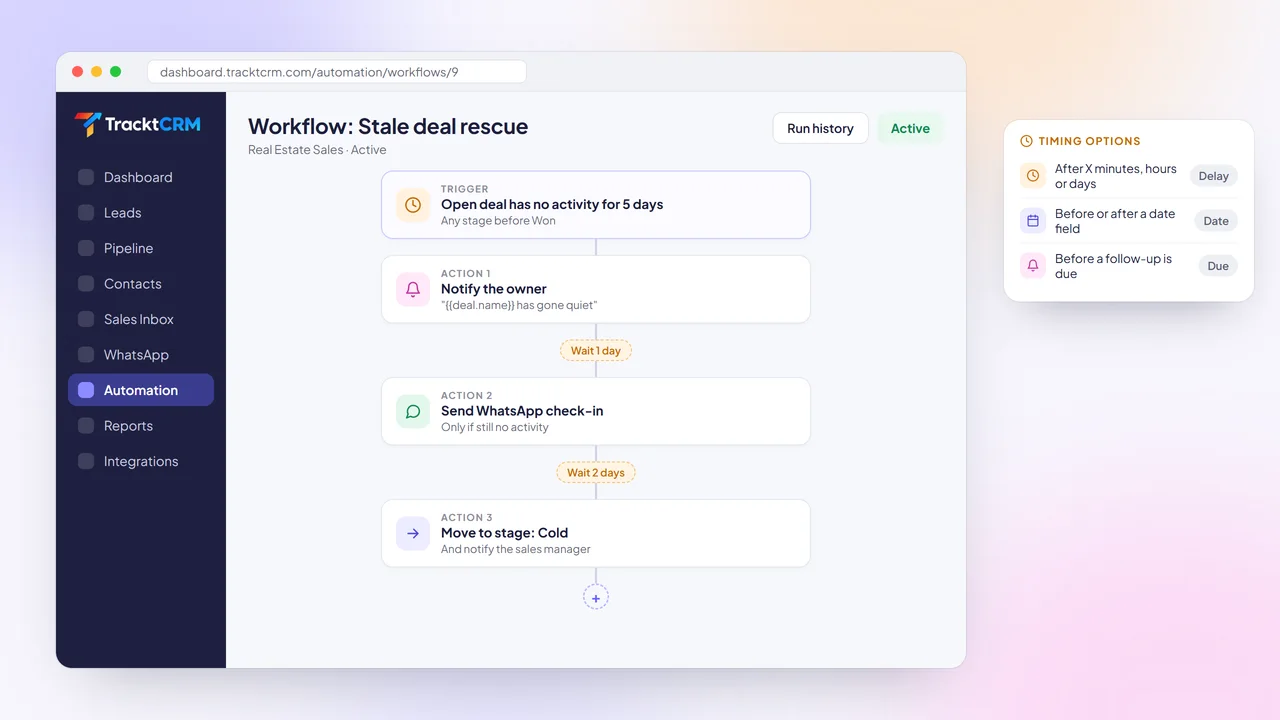
Wait minutes, hours or days, or run a step before or after a date field such as a visit or renewal date.
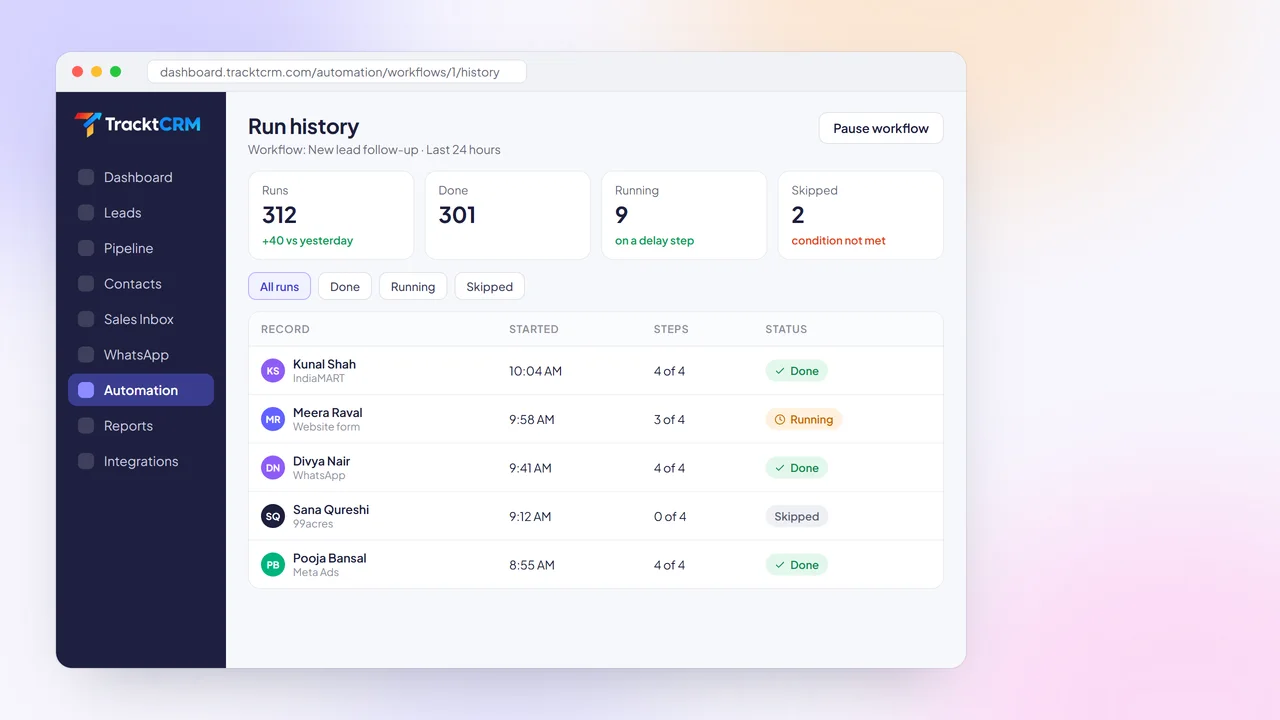
Test a workflow before switching it on, then see which records it ran on and how each step went.
BUYER'S GUIDE
Automation only helps if your team can set it up and trust it. Check for these.
Stage changes, inactivity, email opens, WhatsApp messages and dates all deserve their own automations.
Rules should read like a sentence, such as 'deal value is more than ₹50L', so anyone can check what a workflow does.
In India that means WhatsApp first, with email as a backup, both using templates and merge fields.
Delays and date-based steps let you follow up at the right moment instead of all at once.
Starting from a tested workflow saves time and shows your team what good automation looks like.
A run history shows exactly what happened to each lead, which makes problems easy to spot and fix.
TRIGGERS AND CONDITIONS
A workflow that only runs on new leads misses most of the sales process.
TracktCRM workflows can start when a record is created or edited, when a deal changes stage or owner, when a tag is added or removed, when a call is logged or a meeting is scheduled, when an email is received or opened, when a WhatsApp message arrives or a form is submitted.
Time-based triggers run before or after a date, when a follow-up is due or when a deal has had no activity for a set number of days. Add conditions so each workflow only runs on the records you want.
AUTOMATED FOLLOW-UPS
Reps juggling forty conversations will miss some follow-ups. That is not a discipline problem. It is a system problem.
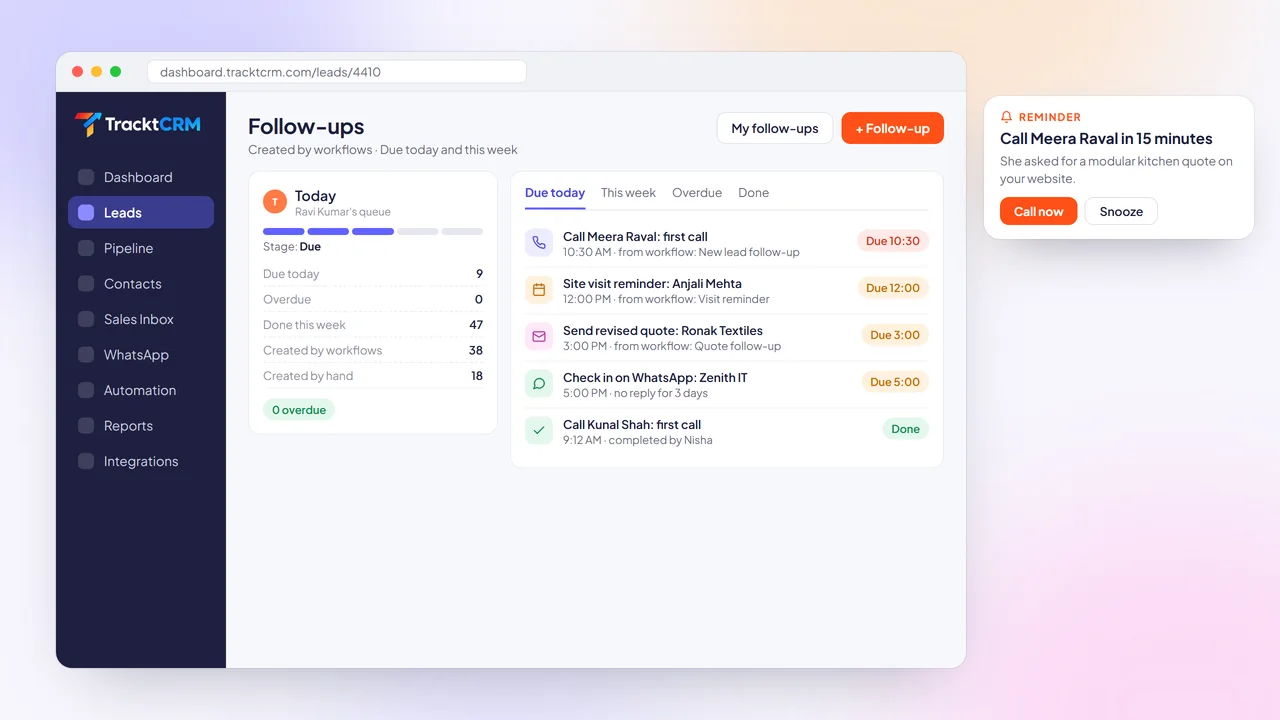
Let workflows create the follow-up for them. A new lead gets a call task due in 15 minutes. A sent quote gets a reminder in two days. A deal with no activity for five days alerts its owner.
Each rep starts the day with a clear list of what is due, with reminders before every call.
AUTOMATED MESSAGES
Buyers expect a reply within minutes, at any hour. Typing the same message by hand cannot keep up.
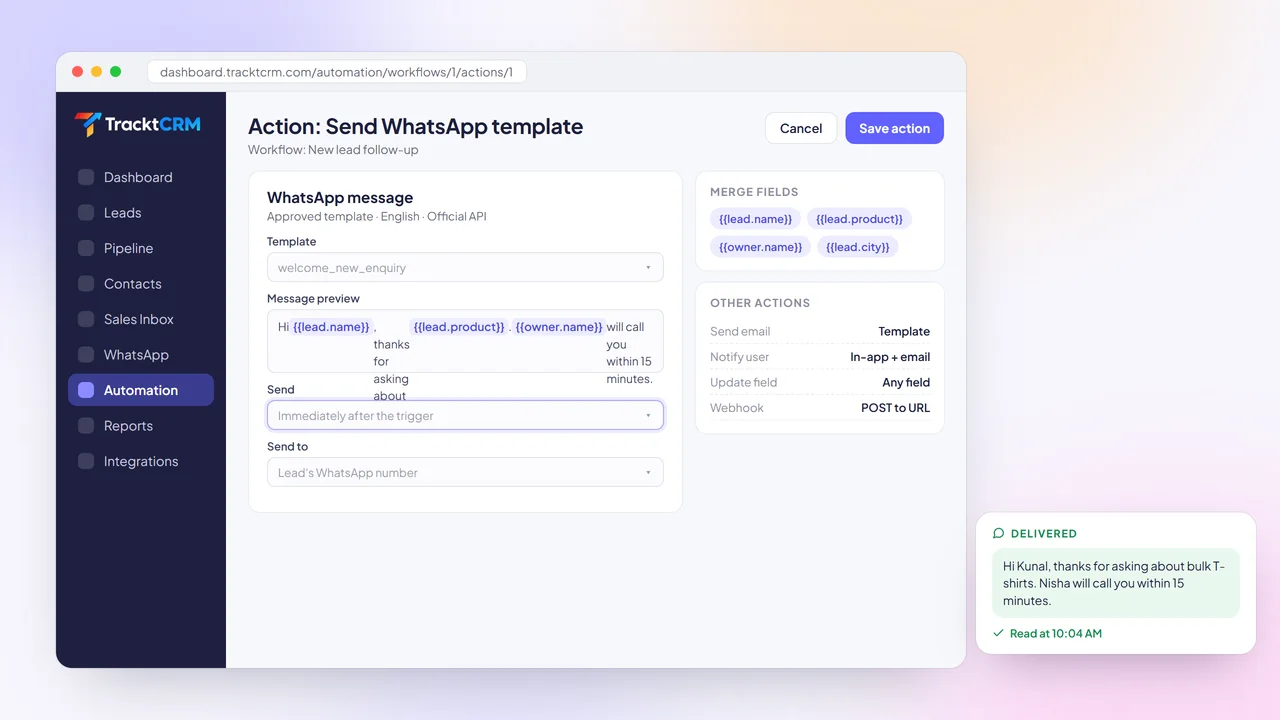
Add a Send WhatsApp or Send email action to any workflow. Use approved WhatsApp Business templates or your email templates, filled in with merge fields such as the lead's name, product and owner.
Use the same workflows to notify a teammate, update a field, add tags or post data to another tool with a webhook.
DELAYS AND SCHEDULES
Sending everything the moment a lead arrives feels robotic. Waiting too long loses the deal.
Add a wait step between actions, from a few minutes to several days, or schedule a step before or after a date such as a site visit, demo or renewal date. Conditions can be re-checked before each step, so a lead who already replied is not chased again.
Combine an inactivity trigger with delays to build a rescue sequence for deals that have gone quiet.
RUN HISTORY
Automation you cannot see is automation you cannot trust.
Every workflow in TracktCRM keeps a run history showing which leads it ran on, when it started, how each step went and whether the run is done, still running or was skipped because a condition was not met.
Test a workflow on a sample record before you switch it on, and pause it in one click while you make changes.
SETUP
Start from a template or build from scratch with three simple cards.
Pick the event that starts the workflow, such as a new lead or a stage change.
Limit it to the right records, for example leads from one city or deals above a value.
Send a message, assign an owner, create a task, add a delay or notify a teammate.
Turn the workflow on and watch the run history as new leads come in.
INTEGRATIONS
Workflows can react to WhatsApp messages, Gmail emails, form submissions and ad leads, and send data to other apps with webhooks.
 WhatsApp
 Gmail
 Google Calendar
 Meta Lead Ads
 Google Ads
 IndiaMART
 Justdial
 99acres
 Housing.com
 Shopify
 Razorpay
 Webhooks
WORKS WELL WITH
These are the workflows most teams switch on in their first week.
Send a WhatsApp template, assign an owner by round-robin and create a call task due in 15 minutes.
When a deal has no activity for five days, alert the owner, then send a check-in message if it is still quiet.
When a deal reaches the visit or demo stage, send a confirmation and remind the owner the day before.
FAQ
Sales automation uses rules inside your CRM to handle routine steps such as replying to new leads, assigning owners, creating follow-ups and alerting managers. In TracktCRM these rules are called workflows.
A record being created or edited, a stage, owner or tag change, a call logged, a meeting scheduled, an email received or opened, a WhatsApp message received, a form submitted, an activity logged, a date, a follow-up becoming due, or no activity for a set number of days.
Assign an owner, update fields, move a deal to another stage, add or remove tags, create a task, follow-up or meeting, notify a user, send an email template, send a WhatsApp message or template, create a record or call a webhook.
Yes. Workflows can send approved WhatsApp Business templates through the official API, with merge fields such as the lead's name. You can also send email templates as a backup.
No. Each workflow is built from three cards: trigger, conditions and actions. You can also start from a template and adjust it. Our team can set up your first workflows during onboarding.
Automation limits depend on your plan. Compare what each plan includes on the pricing page, or start on the Free plan and upgrade when you need more workflows.
MORE FEATURES
Switch on your first workflow today and let TracktCRM reply, assign and follow up for you. Free plan for 1 user, no credit card needed.