
Gmail sync
Connect Gmail once. Emails with your leads and contacts show up on their records automatically.
THE BASICS
CRM email integration connects your mailbox to your CRM, so emails with a lead appear on that lead automatically and you can send emails without leaving the CRM. Your inbox and your customer records stay in step.
Add email tracking and you also know when a buyer opens what you sent. That turns a guess about when to follow up into a clear signal.
FEATURES
Write, send, track and automate sales emails in the same place you manage leads and deals.
Connect Gmail once. Emails with your leads and contacts show up on their records automatically.
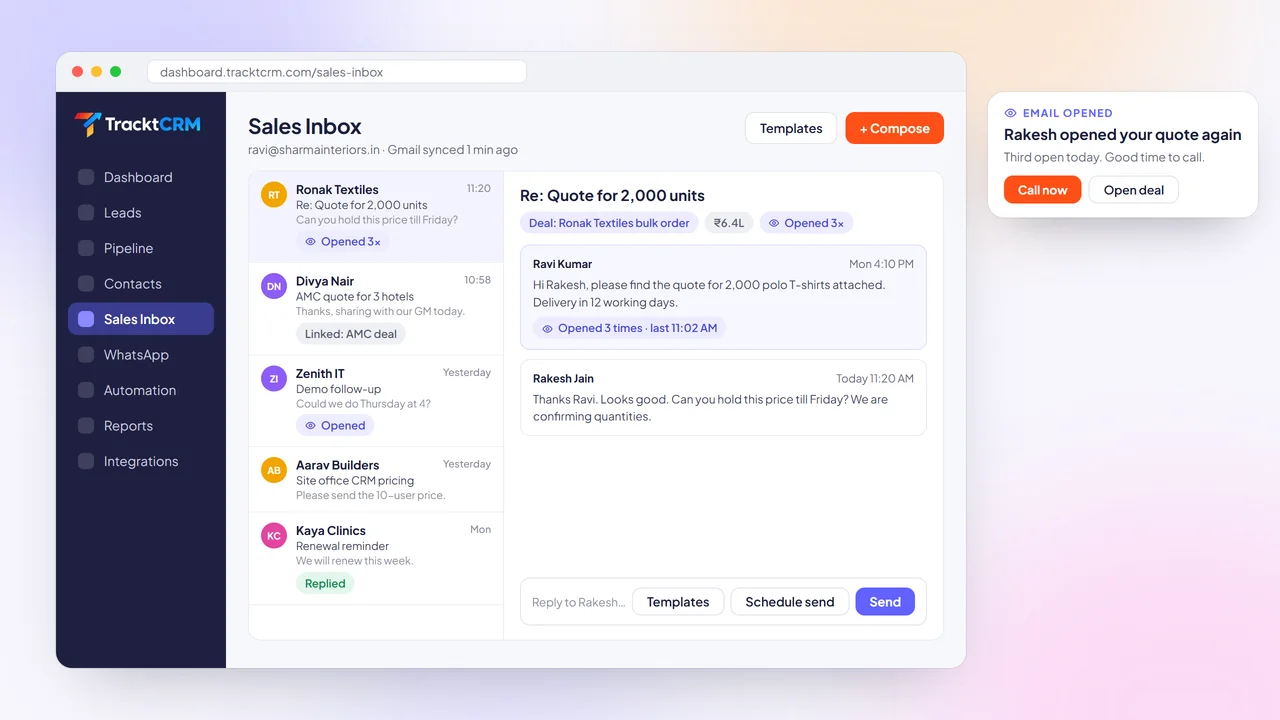
Read and reply to sales emails inside TracktCRM, with each thread linked to its lead or deal.
Every email sits in the lead timeline next to calls, WhatsApp chats, notes and files.
Save templates with merge fields, Cc, Bcc and attachments, and reuse them in emails and workflows.
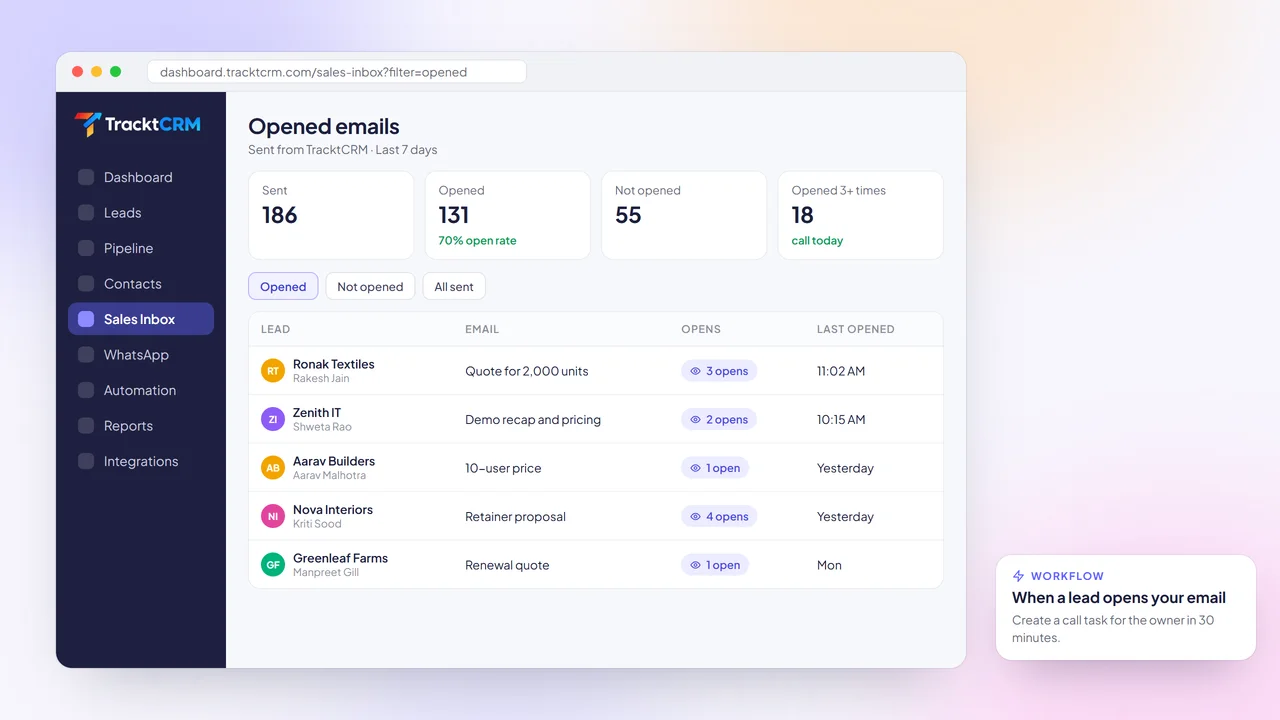
See when a buyer opens your email and how many times, right on the email and the lead.
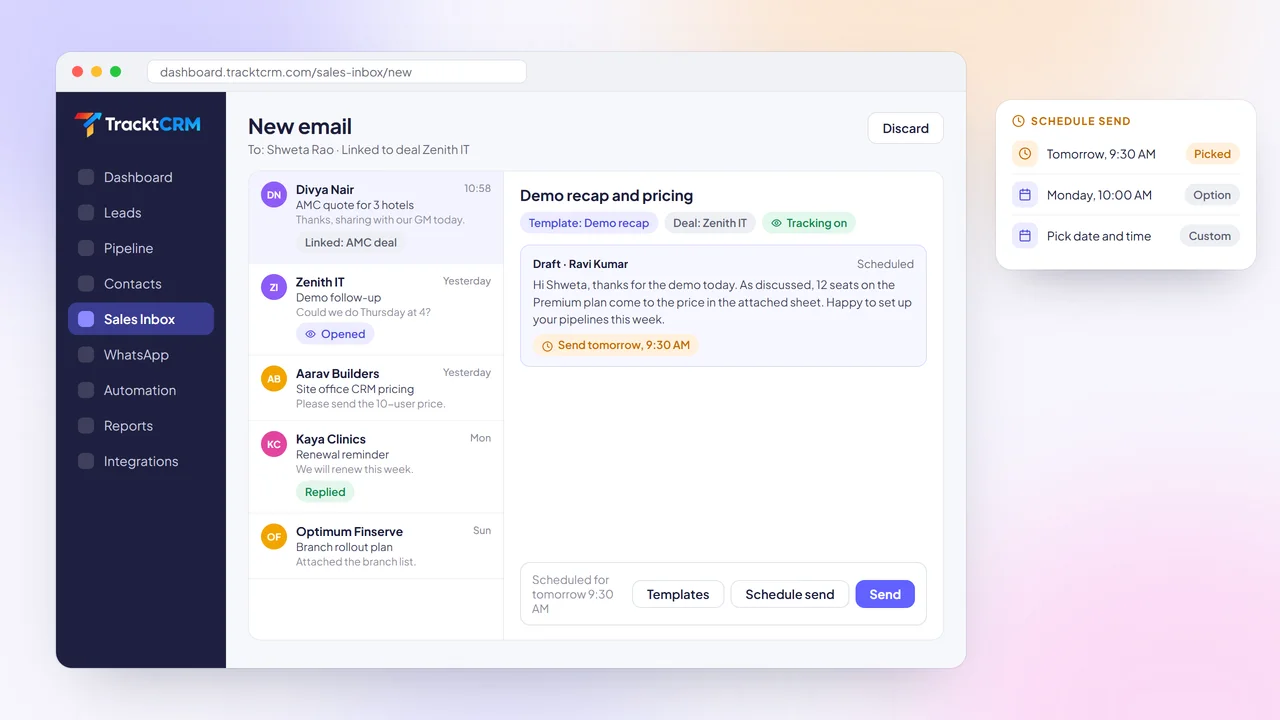
Write now and pick the date and time it goes out, so emails land when buyers are at their desks.
BUYER'S GUIDE
Email is still where quotes, proposals and contracts get sent. Make sure your CRM handles it properly.
Connecting your mailbox should take one sign-in, not an IT ticket.
Emails should attach to the right lead or contact by email address, without forwarding or copy-paste.
Reusable templates that fill in names, products and owner details keep emails fast and consistent.
Knowing a quote was opened tells you when to call while the buyer is still thinking about it.
Schedule send helps you reach buyers in the morning, even if you write the email late at night.
Email received and email opened events should be able to start workflows and create follow-ups.
GMAIL SYNC
If emails live in separate tools, reps waste time searching for context and managers never see the full conversation.
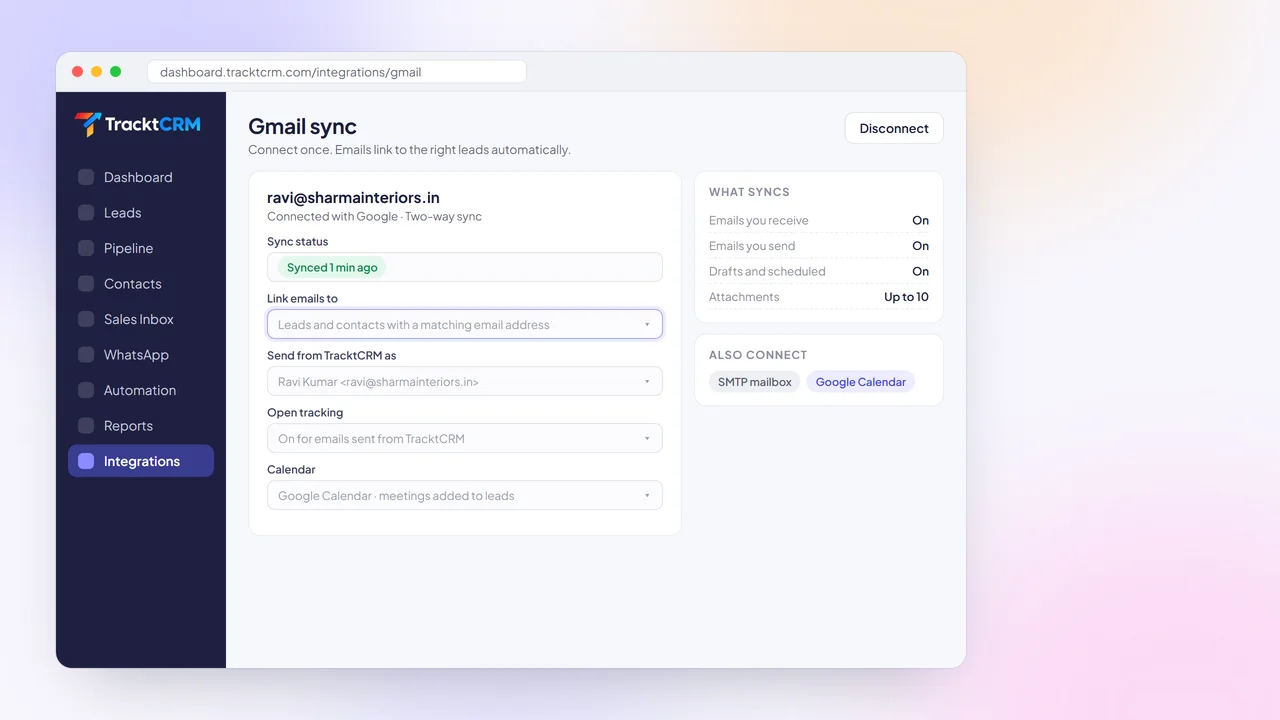
Connect your Gmail account to TracktCRM with a Google sign-in. Emails with a lead or contact are matched by email address and appear on their record automatically, both the ones you send and the ones you receive.
You can also connect an SMTP mailbox for sending, and Google Calendar so meetings sit next to the emails that led to them.
CONVERSATION HISTORY
A reply written without the earlier thread feels slow and generic, and buyers notice.
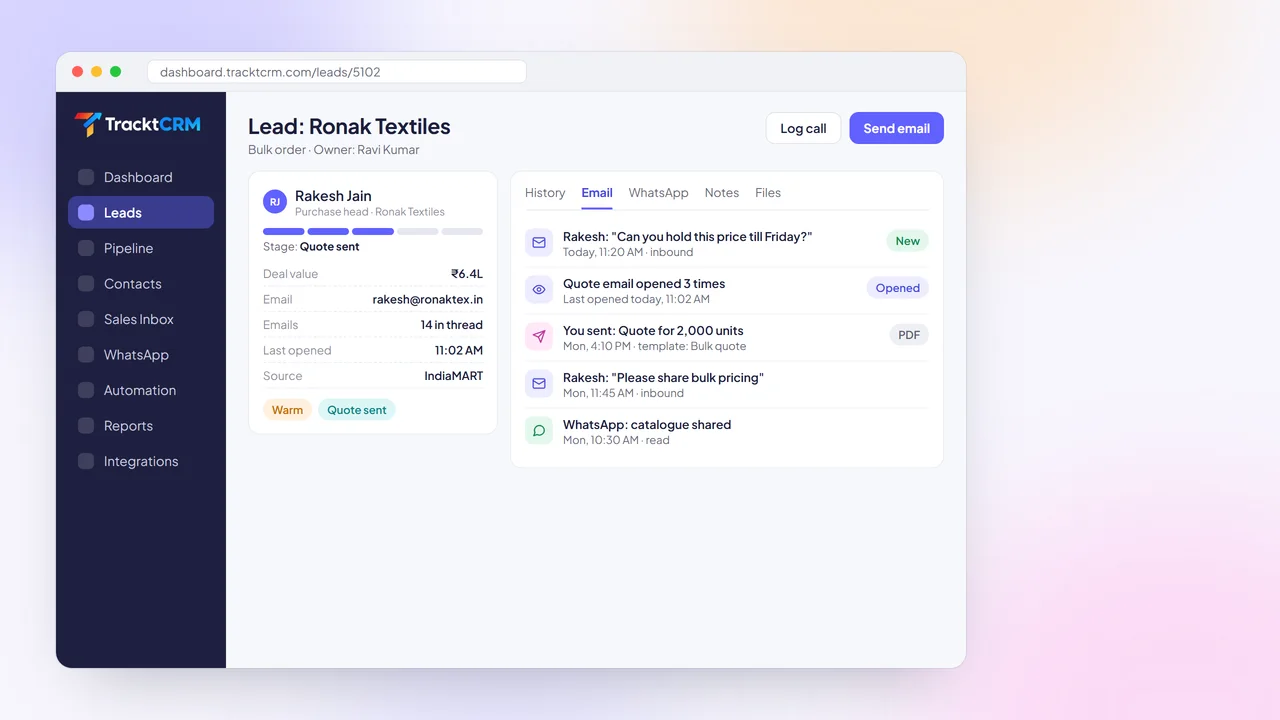
Open any lead or deal in TracktCRM and the Email tab shows the full thread, alongside calls, WhatsApp messages, notes and files in the history timeline.
Whoever picks up the deal next, whether a teammate or a manager, sees exactly what was said and sent.
EMAIL TEMPLATES
Typing the same quote email twenty times a week wastes time and makes your outreach inconsistent.
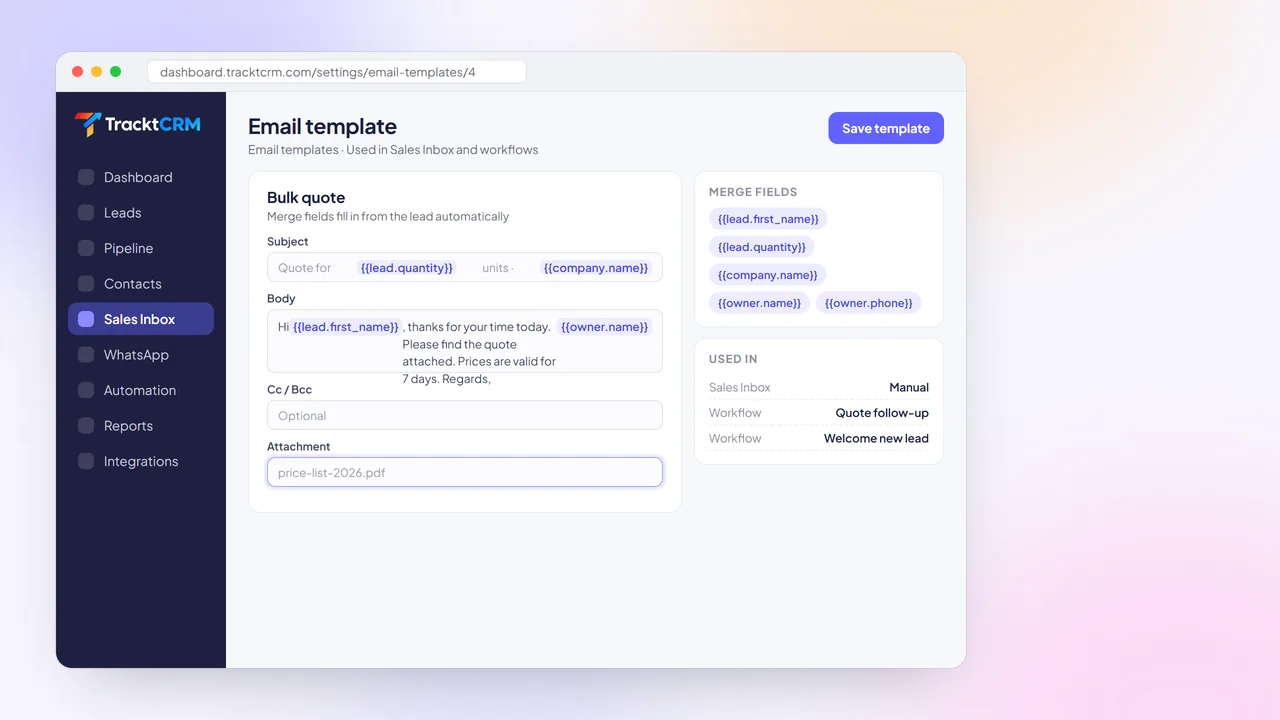
Create templates in TracktCRM with a subject, body, Cc, Bcc and attachments. Merge fields fill in the lead's name, company, product and the owner's details automatically when you send.
Use the same templates in workflows, so automated emails sound as good as the ones you write by hand.
EMAIL TRACKING
Without open tracking, you either follow up too early and annoy the buyer, or too late and lose them.
TracktCRM tracks opens on emails you send from the CRM. See the open count and last open time on each email, spot buyers who keep coming back to your quote, and call while it is fresh in their mind.
Use the email opened trigger to create a follow-up task for the owner automatically.
SCHEDULE SEND
The best time to write an email is not always the best time to send it.
Write your email, choose a date and time, and TracktCRM sends it then. Scheduled emails and drafts sit on the lead, so you can edit or cancel them before they go out.
Pair schedule send with workflows and delays to keep a steady rhythm of follow-ups without watching the clock.
SETUP
It takes a few minutes and works with the Gmail account you already use.
Sign in with Google from the integrations page and allow TracktCRM to sync your mail.
Emails with your leads and contacts appear on their records automatically.
Save your most-used emails as templates with merge fields and attachments.
Watch opens, schedule sends and add workflows that react to email activity.
INTEGRATIONS
Gmail, Google Calendar and WhatsApp keep every conversation and meeting on the same lead, next to leads from your ads and portals.
 WhatsApp
 Gmail
 Google Calendar
 Meta Lead Ads
 Google Ads
 IndiaMART
 Justdial
 99acres
 Housing.com
 Shopify
 Razorpay
 Webhooks
WORKS WELL WITH
Buyers reply on whichever channel is easiest for them. Keep all of it in one place.
Send WhatsApp templates and keep chats on the lead, right next to your emails.
Trigger workflows when an email is received or opened, and send email templates automatically.
Reply to new enquiries in seconds with personalised AI responses based on what the lead shared.
FAQ
Open Integrations, choose Gmail and sign in with your Google account. Once connected, emails with your leads and contacts sync to their records and you can send emails from TracktCRM.
It connects your mailbox to your CRM so emails are linked to the right leads and deals automatically, and you can send emails from inside the CRM. It removes manual logging and keeps the full conversation visible to your team.
Yes. Emails sent from TracktCRM include open tracking. You can see the open count and the last time the email was opened, and use the email opened trigger to start a workflow.
Yes. Write your email, pick a date and time and TracktCRM sends it then. Scheduled emails stay on the lead so you can edit or delete them before they go out.
Yes. Templates can include merge fields such as the lead's name and company, plus Cc, Bcc and attachments. Templates can be used by hand or in workflows.
You can connect an SMTP mailbox for sending emails from TracktCRM. Gmail sync is used for two-way syncing of your inbox.
MORE FEATURES
Connect Gmail in minutes and see your conversations on every lead. Free plan for 1 user, no credit card needed.