
Custom stages and fields
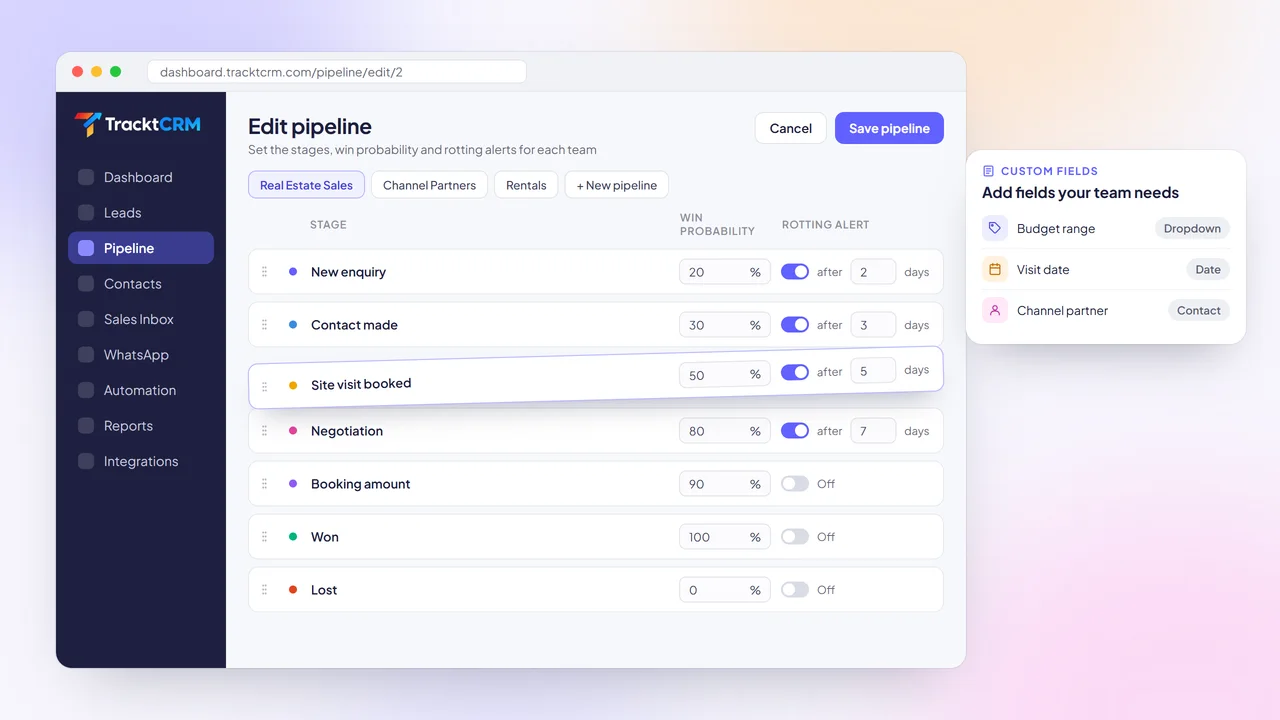
Name your stages, set a win probability for each one and add custom fields such as budget, product or visit date.
THE BASICS
A sales pipeline is the list of stages a buyer passes through, from the first enquiry to a signed deal. Pipeline management is how you run it: setting clear stages, keeping each deal's next step on the calendar and spotting where deals get stuck before they are lost.
Good pipeline management answers three questions at any moment: how much is in play, what each rep should do today, and which stage is leaking the most deals. A pipeline CRM answers them from live data instead of a weekly report.
FEATURES
Everything you need to run a deal pipeline sits in one place, from setting up stages to reviewing why deals were won or lost.
Name your stages, set a win probability for each one and add custom fields such as budget, product or visit date.
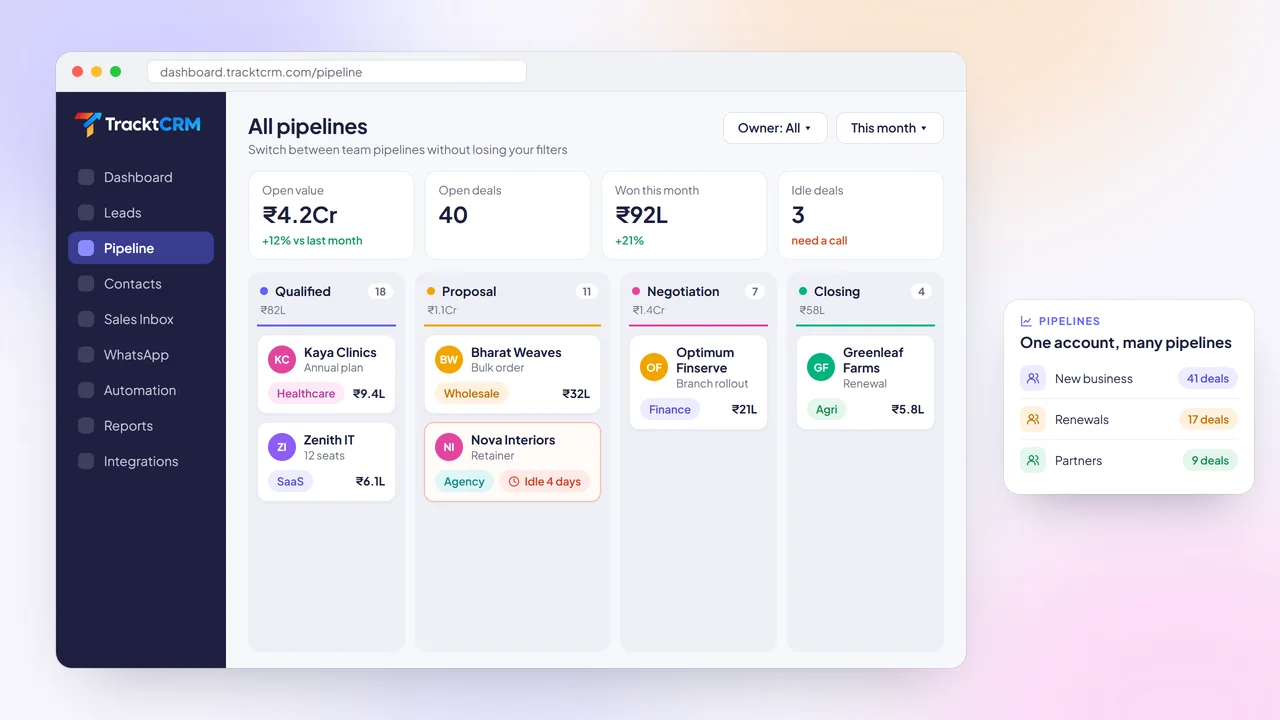
Run separate pipelines for new business, renewals, rentals or partner deals, each with its own stages and team.
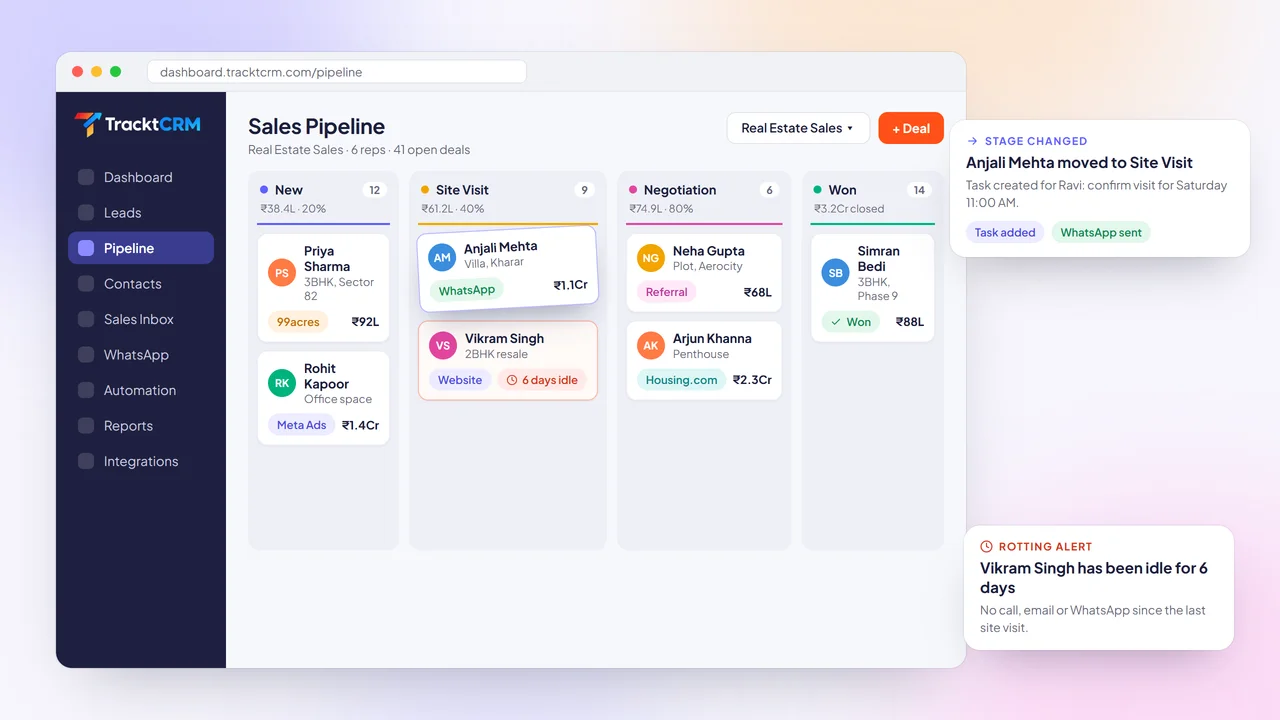
Move a deal to the next stage by dragging its card. Totals per stage update instantly, in your currency.
Choose how many days a deal can sit in a stage. Idle deals turn red so nobody forgets them.
When a deal changes stage, TracktCRM can create a task, send a WhatsApp or email template and notify the owner.
Track deals won and lost, revenue won, lost reasons and performance by rep, pipeline and period.
BUYER'S GUIDE
Before you pick a pipeline management tool, check that it can do these five things without extra add-ons.
Your pipeline should mirror your sales process. Look for custom stages, win probabilities and fields you can add yourself, without a developer.
CSV import, Google Sheets import and a free plan let your team move over in an afternoon instead of a quarter.
Follow-ups, calls and meetings should live on the deal card with reminders, not in a separate to-do app.
Reps should be able to call, email and WhatsApp a buyer from the deal itself, with every message saved to its history.
Workflows that react to stage changes and idle deals keep the pipeline moving even when the team is busy.
Won and lost deals, lost reasons and rep activity should come from the same data reps update every day.
CUSTOMIZE YOUR PIPELINE
A real estate team needs a site visit stage. An agency needs proposal and retainer stages. When a CRM forces one generic pipeline on everyone, reps stop updating it.
In TracktCRM you name every stage, drag stages into order and set a win probability for each. Add custom fields for the details your team asks on every call, such as budget, location or quantity.
Start from a ready-made pipeline template for your industry, then change it whenever your process changes. Existing deals stay where they are.
VISUAL PIPELINE
When deals live in WhatsApp chats and notebooks, a manager only finds out a deal is stuck when it is already lost.
TracktCRM shows your deal pipeline as a board. Each column is a stage with its deal count and total value, and each card shows the buyer, value, source and owner. Filter by owner, pipeline or period in one click.
Run more than one pipeline from the same account and switch between them without losing your filters, so sales, renewals and partner deals each get a clean view.
ACTIVITY TRACKING
Most lost deals are not lost to a competitor. They are lost to a follow-up nobody made.
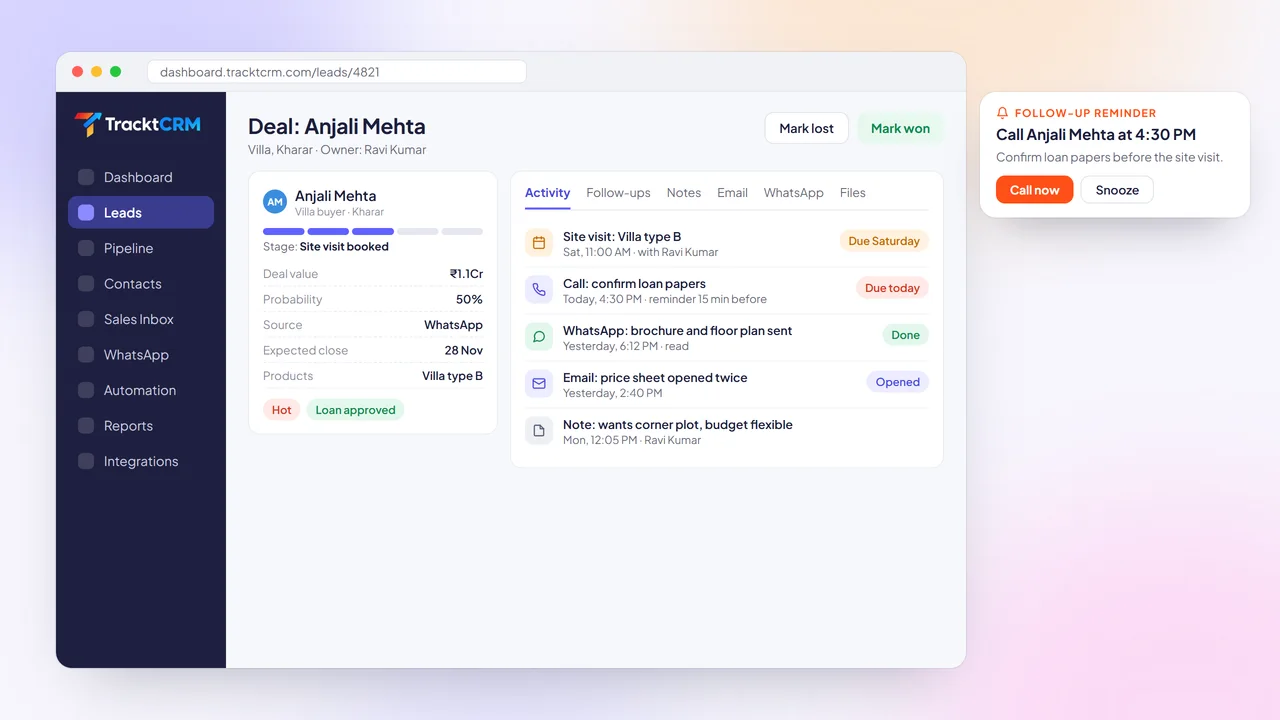
Every deal in TracktCRM carries its own follow-ups, calls, meetings, notes, files, emails and WhatsApp messages. Reps see what is due today, get a reminder before each call and can log the outcome in a few taps.
Turn on rotting alerts per stage and TracktCRM flags any deal that has had no activity for the number of days you choose.
WORKFLOW AUTOMATION
Updating owners, sending the same confirmation message and creating the same task after every stage change eats hours each week.
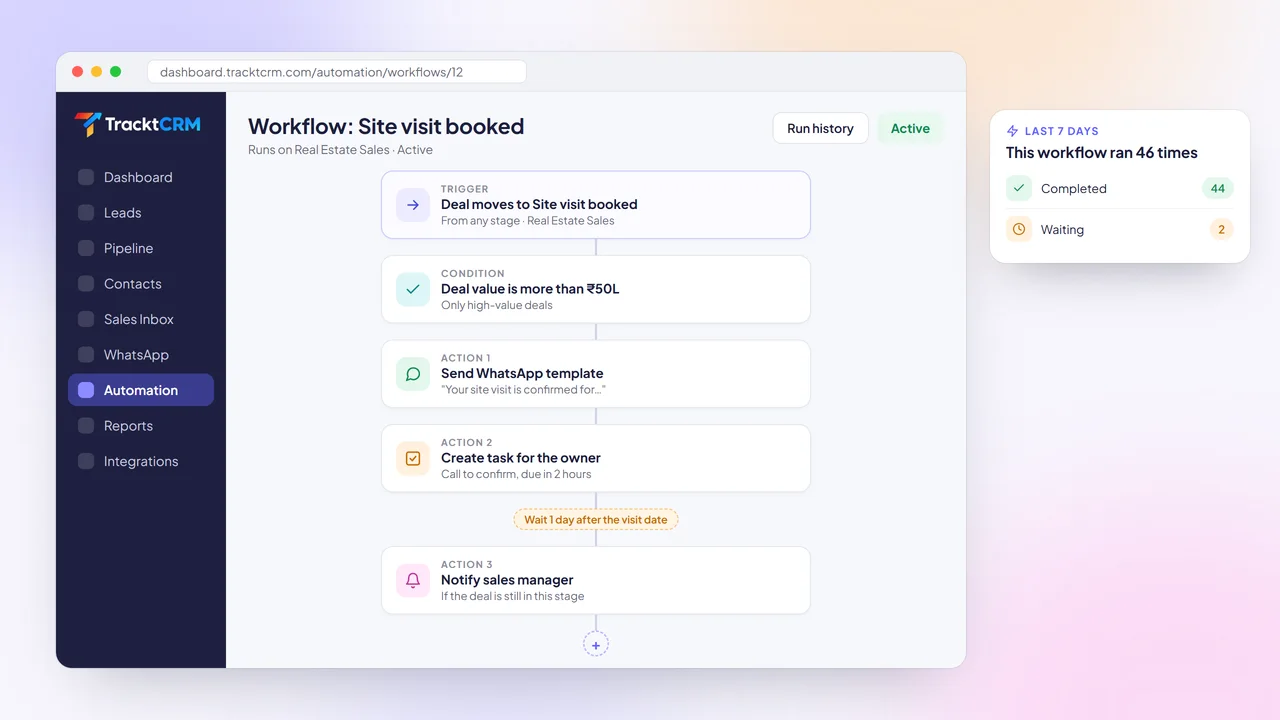
With TracktCRM workflows, a stage change can send a WhatsApp or email template, create a task for the owner, move a deal, add a tag or notify a manager. Add conditions such as deal value, and delays such as one day after the visit date.
Every run is logged, so you can see exactly what each workflow did and when.
PIPELINE ANALYTICS
If you cannot see why deals are lost, you keep losing them for the same reason.
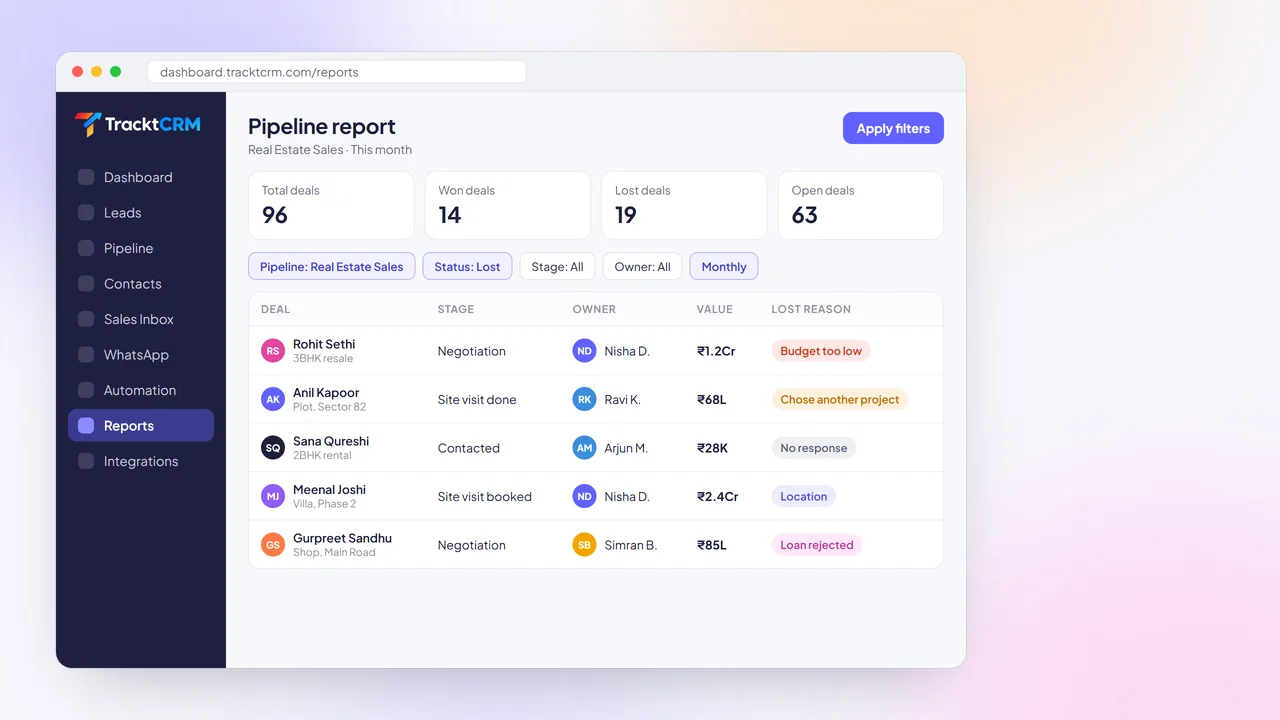
TracktCRM records a lost reason on every lost deal. Filter reports by pipeline, stage, status, owner and period to see how many deals were won, lost or are still open, and check revenue won per rep on the dashboard.
Use what you learn to fix the stage that loses the most deals and coach the right rep.
SETUP
Most teams have a working pipeline on day one. Our team can set it up for you on a demo call.
Choose a pipeline for your industry or start blank, then rename stages and set win probabilities.
Import a CSV or Google Sheet, or connect lead sources so new enquiries land in the first stage.
Turn on rotting alerts and add workflows that create follow-ups when deals change stage.
Use pipeline reports and lost reasons to see which stage needs attention.
INTEGRATIONS
Leads from WhatsApp, ads, portals and your website land in the right pipeline automatically, and Gmail and Google Calendar keep every conversation and meeting on the deal.
 WhatsApp
 Gmail
 Google Calendar
 Meta Lead Ads
 Google Ads
 IndiaMART
 Justdial
 99acres
 Housing.com
 Shopify
 Razorpay
 Webhooks
WORKS WELL WITH
Pipeline management works best when new enquiries arrive with their source and details already filled in.
Build a form, choose its pipeline, stage and owner, and embed it on any website. Submissions become deals instantly.
New WhatsApp chats can create leads, and every message stays on the deal for the whole team to see.
Answer new enquiries within seconds so they reach your pipeline while the buyer is still interested.
FAQ
Pipeline management in a CRM means tracking every deal through the stages of your sales process in one shared system. In TracktCRM you see deals on a drag-and-drop board, each with its value, owner, next step and full history, so the whole team works from the same live pipeline.
Keep stages simple and specific to your process, make sure every open deal has a dated next step, review idle deals every week and record why deals are lost. TracktCRM helps with custom stages, follow-up reminders, rotting alerts and lost reason reports.
Yes. You can run separate pipelines for different products, teams or regions, each with its own stages and win probabilities. Pipeline limits depend on your plan, which you can compare on the pricing page.
Yes. Import deals from a CSV file or Google Sheets and map columns to TracktCRM fields. If you are switching from another CRM, our team can help migrate your data during onboarding.
A rotting deal is one that has sat in the same stage with no activity for longer than you expect. In TracktCRM you set the number of days per stage, and deals that cross it are highlighted so the owner follows up.
TracktCRM runs in any modern browser, including phone browsers, so reps can check their pipeline, log a call or move a deal from the field.
Yes. The Free plan is free forever for 1 user with no credit card needed. Upgrade to Pro, Premium or All-in-One when you need more users, pipelines, automations or AI.
MORE FEATURES
Set up your stages, import your deals and see your whole pipeline in minutes. Free plan for 1 user, no credit card needed.