
One leads list
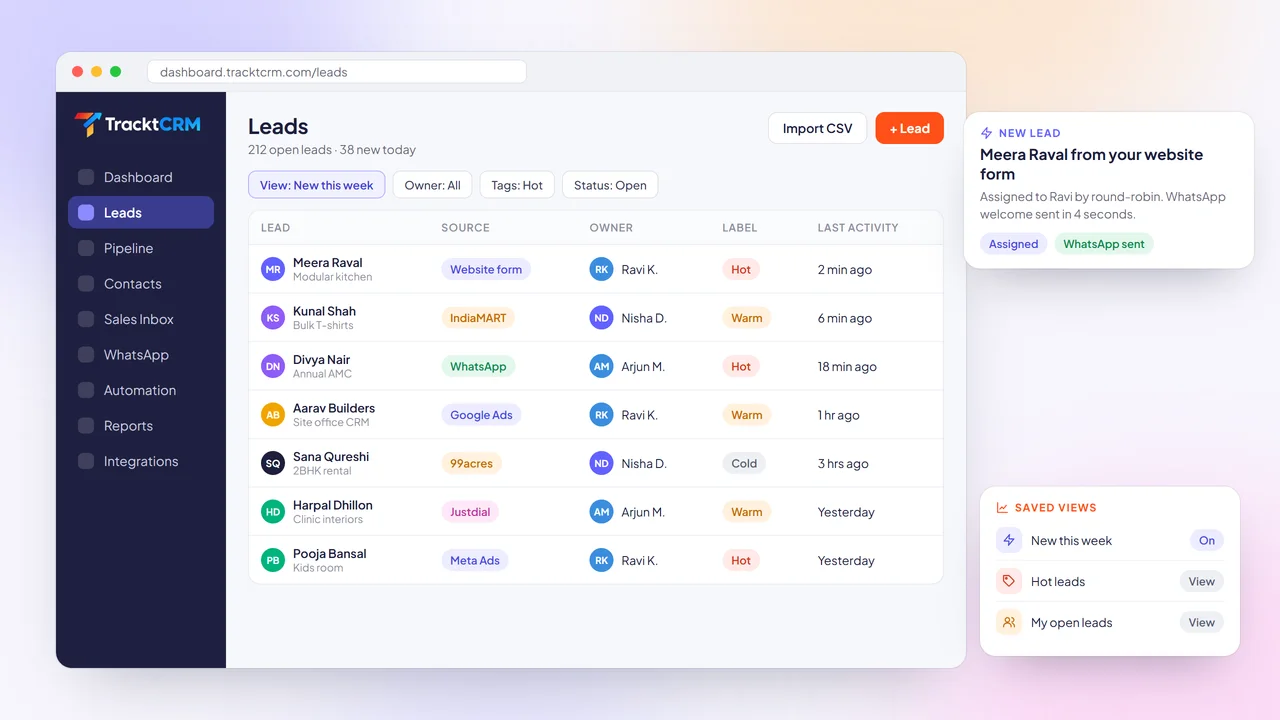
Leads from every source land in the same list with their source, campaign and details filled in.
THE BASICS
A lead management system collects enquiries from every channel, decides who handles each one, and tracks every lead until it is either a deal or ruled out. It replaces the shared spreadsheet, the forwarded emails and the screenshots on WhatsApp groups.
The goal is simple: reply first, follow up on time and never lose track of who is talking to whom. Lead tracking in one place also keeps the source on every lead, so you always know where a buyer came from.
FEATURES
From the moment an enquiry arrives to the moment it turns into a deal, every step runs in one place.
Leads from every source land in the same list with their source, campaign and details filled in.
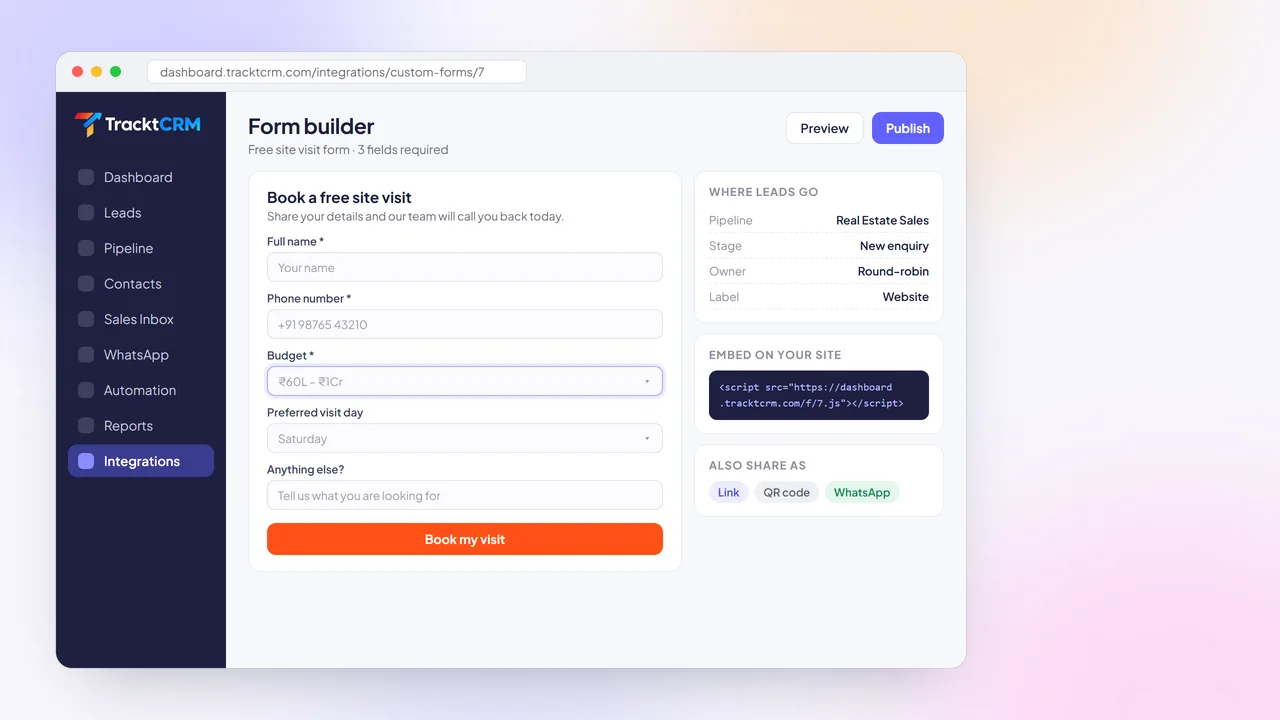
Build forms with your own fields, embed them on any website or share them as a link.
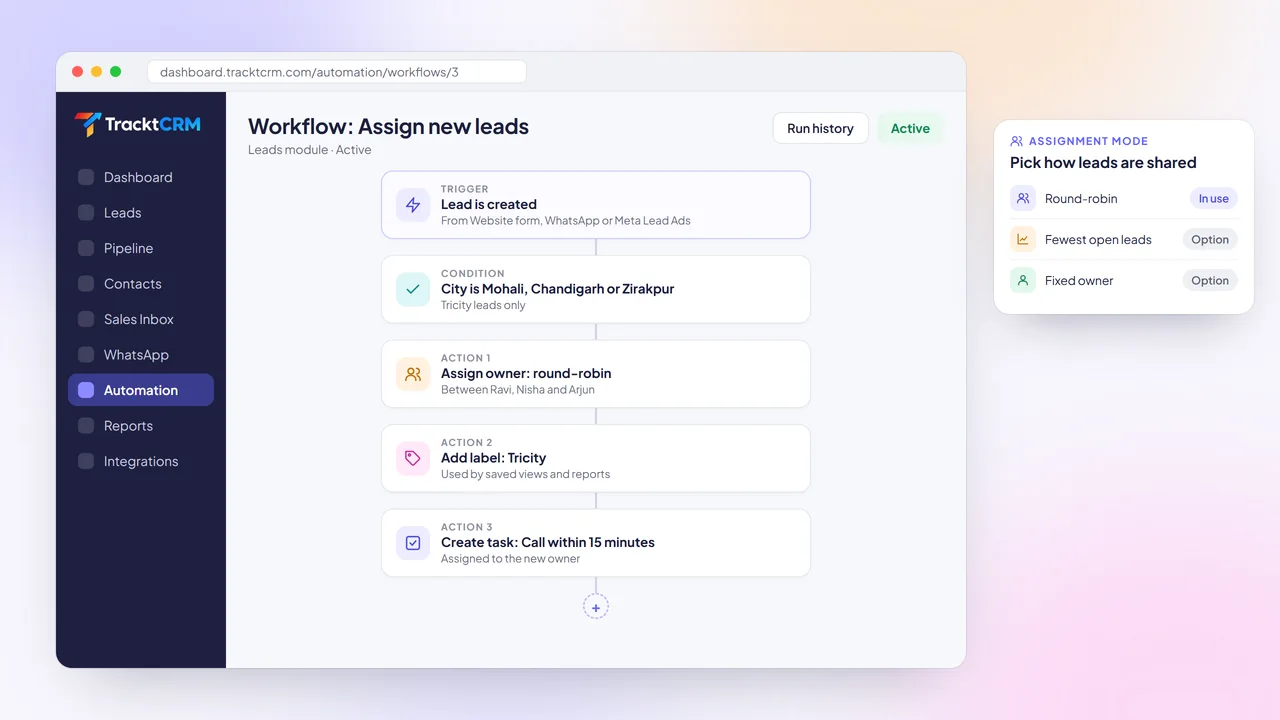
Share new leads by round-robin, send them to whoever has the fewest open leads, or pick a fixed owner.
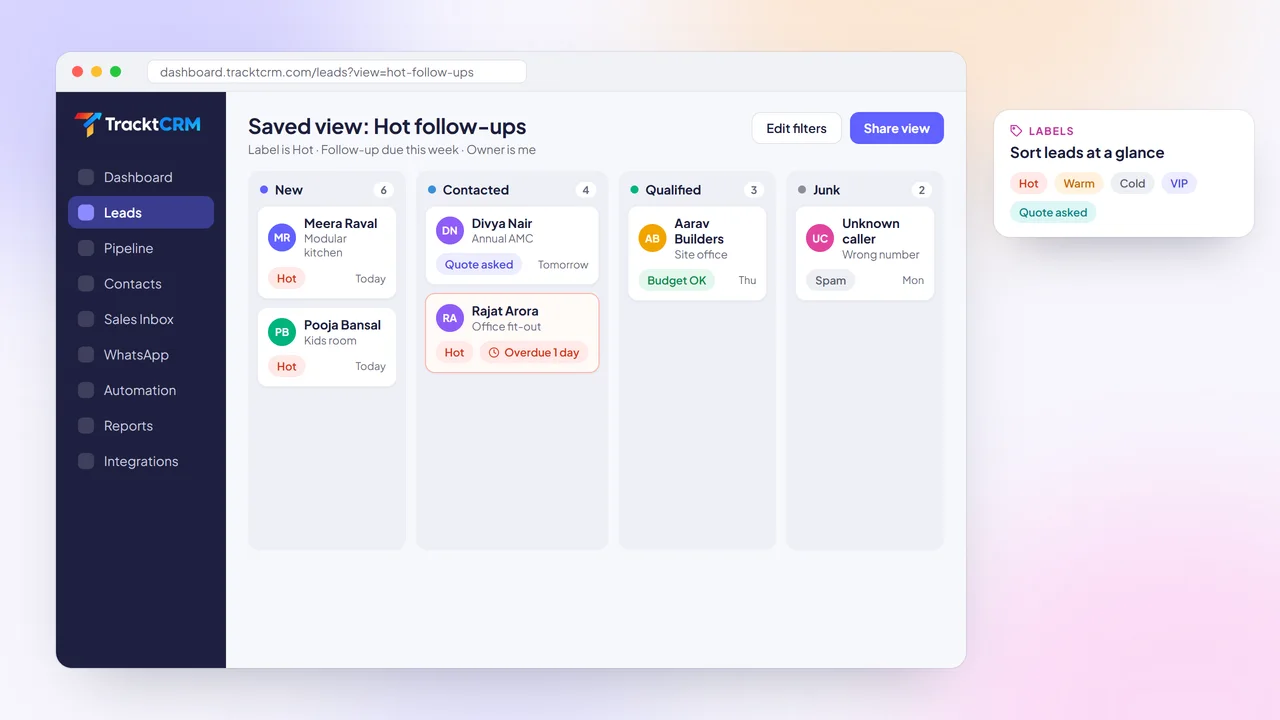
Tag leads hot, warm or cold, add your own labels and save filtered views for each rep.
Import CSV files, sync Google Sheets and connect lead sources like IndiaMART, Justdial and 99acres.
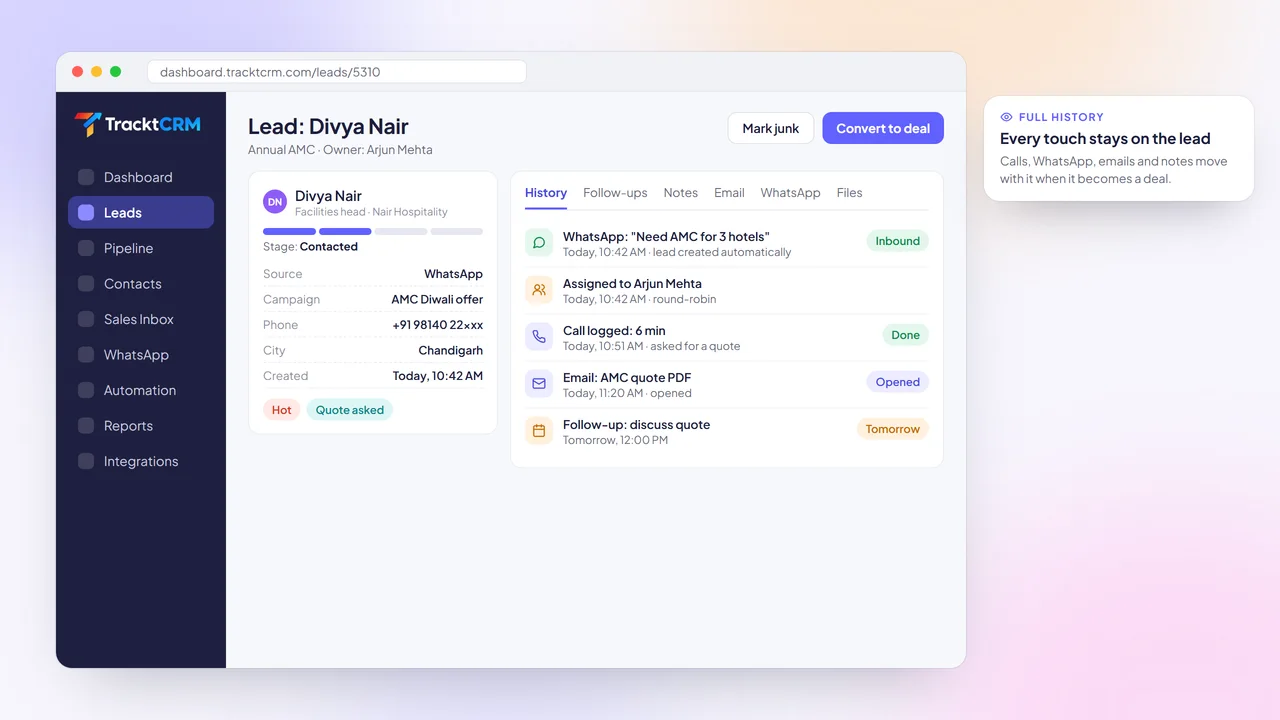
Calls, emails, WhatsApp chats, notes, files and follow-ups stay on the lead from day one.
BUYER'S GUIDE
A lead management tool should cut your reply time on day one. Check for these before you sign up.
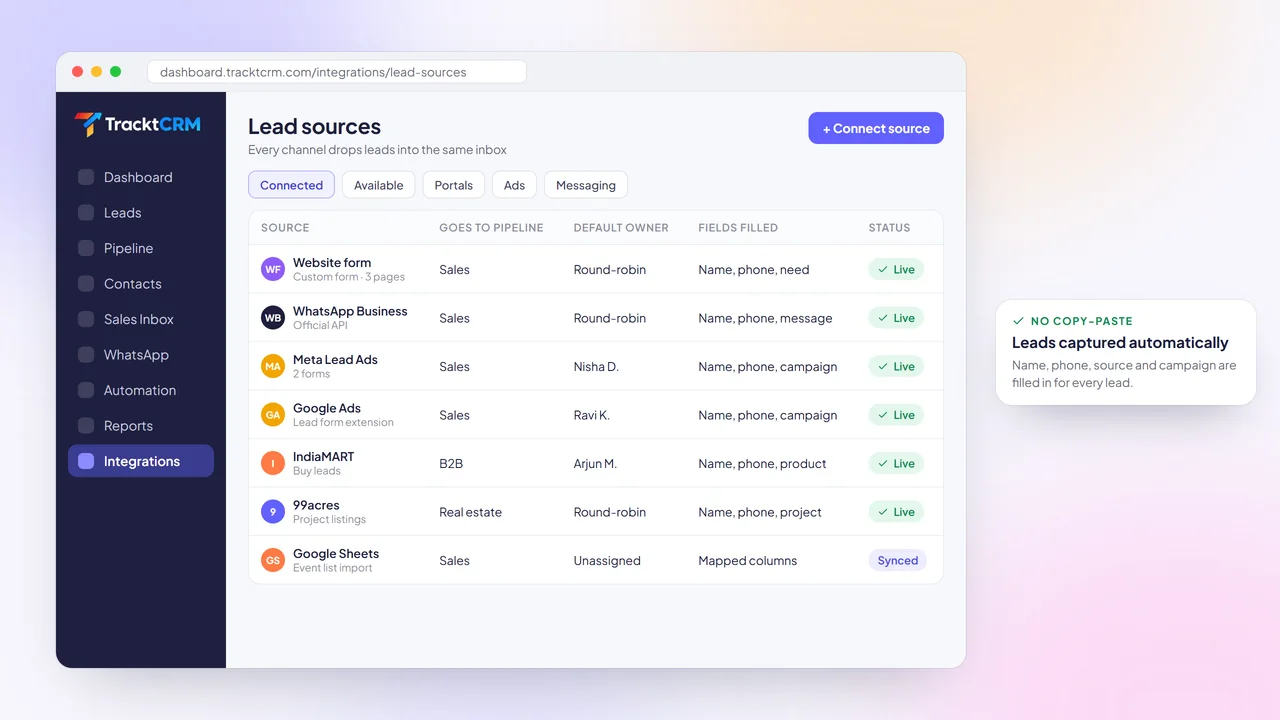
Website forms, WhatsApp, Meta and Google ads and the portals you advertise on should feed leads in without copy-paste.
Rules that share leads across the team automatically mean nobody waits for a manager to forward an enquiry.
Labels, custom fields and lost reasons help reps sort serious buyers from time-wasters in seconds.
Every lead should have a next step with a reminder, so warm leads do not cool off over a weekend.
When a lead is ready, it should become a deal in your pipeline without losing its notes or messages.
Every lead should keep its source automatically, so you always know which channel a buyer came from.
LEAD CAPTURE
When enquiries arrive by email, portal dashboards and personal WhatsApp numbers, somebody has to copy them into a sheet. Leads wait, details get lost and nobody knows the true source.
TracktCRM connects your lead sources once. Website forms, WhatsApp Business, Meta Lead Ads, Google Ads, IndiaMART, Justdial, 99acres, Housing.com and Google Sheets all drop leads straight into the right pipeline.
Each lead arrives with its name, phone, source and campaign, so you know where every enquiry came from on the first day.
LEAD ASSIGNMENT
A lead that waits an hour for someone to pick it up is often already talking to a competitor.
Set assignment rules once in TracktCRM. Share leads by round-robin, send each new lead to the rep with the fewest open leads, or route by city, product or source using conditions.
The same workflow can add a label, create a call task due in 15 minutes and send a WhatsApp welcome, so the buyer hears from you almost immediately.
WEB FORMS
Generic contact forms send an email that someone has to read, forward and type into a CRM.
Build a lead capture form in TracktCRM with the fields you need, such as budget or preferred visit day. Choose which pipeline, stage and owner each submission goes to.
Embed the form on your website with one line of code, or share it as a link or QR code on WhatsApp, Instagram and print.
LEAD QUALIFICATION
When every lead looks the same, reps call whoever is at the top of the list instead of whoever is most likely to buy.
Use labels like Hot, Warm, Cold or VIP, add custom fields for budget or timeline, and mark junk leads with a reason. Saved views let each rep open exactly the leads they should work on today.
Managers can share views with the team, so everyone follows the same priorities.
LEAD TO DEAL
Switching tools when a lead turns serious means re-typing details and losing the conversation that got you there.
In TracktCRM a lead and its deal are the same record. The first WhatsApp message, the owner assignment, every call, email and note travel with it into your pipeline.
Anyone who picks up the deal later sees the whole history in one timeline, so the buyer never has to repeat themselves.
SETUP
Connect a source, set a rule and let the next enquiry show you how it works.
Link your website form, WhatsApp, ad accounts and portals, or import a CSV of existing leads.
Pick round-robin, least-busy or fixed owner, and add conditions for city or product.
Send a WhatsApp or email template automatically and create a call task for the owner.
Label, follow up and convert serious leads into deals in your pipeline.
INTEGRATIONS
Connect ad platforms, portals, WhatsApp and your website in a few clicks. No code and no copy-paste.
 WhatsApp
 Gmail
 Google Calendar
 Meta Lead Ads
 Google Ads
 IndiaMART
 Justdial
 99acres
 Housing.com
 Shopify
 Razorpay
 Webhooks
WORKS WELL WITH
Lead management pays off when the first reply goes out before the buyer moves on.
Send a personalised reply to every new enquiry within seconds, using the details the lead shared.
Answer leads from a shared WhatsApp inbox, with approved templates and every chat saved to the lead.
See new leads, revenue won, lost deals and the latest team activity on one live screen.
FAQ
It collects enquiries from all your channels into one place, assigns each lead to a rep, tracks follow-ups and conversations, and moves qualified leads into your sales pipeline. TracktCRM does all of this in one product.
Website forms, WhatsApp Business, Meta Lead Ads, Google Ads, IndiaMART, Justdial, 99acres, Housing.com, MagicBricks, Google Sheets and CSV imports, plus webhooks for other tools. See the integrations page for the full list.
You create a workflow that runs when a lead is created. Choose round-robin between selected reps, send each lead to whoever has the fewest open leads, or assign a fixed owner. Conditions let you route by city, product, source or any field.
Yes. Add labels to any lead, create your own labels and filter or save views by label. Workflows can also add or remove labels automatically.
Nothing is lost. In TracktCRM the lead and the deal are the same record, so calls, emails, WhatsApp messages, notes and files stay attached as it moves through your pipeline.
This page walks through the lead management features inside TracktCRM. Our lead management software guide covers how to choose a tool and set up a lead process for your team.
Yes. The Free plan is free forever for 1 user with no credit card needed. Paid plans add more users, pipelines, automations and AI.
MORE FEATURES
Connect your first lead source in minutes. Free plan for 1 user, no credit card needed.